See your accounts clearly
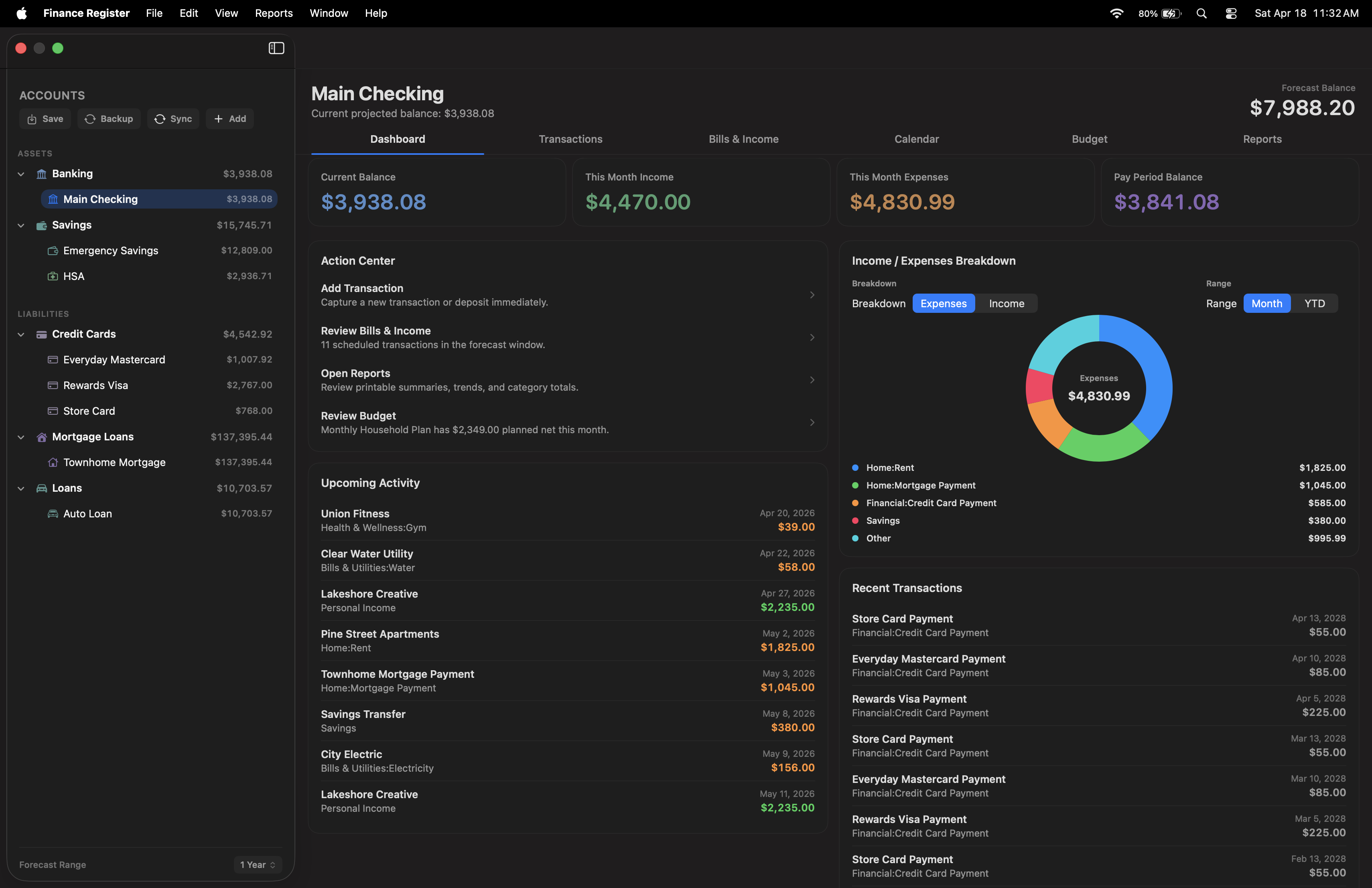
Work across checking, savings, cash, credit card, mortgage, and loan accounts — each with views designed for that account type.
 Finance Register
Local-first finance app for Mac
Finance Register
Local-first finance app for Mac
Built for Mac · iPhone companion
Finance Register is a local-first app for Mac that brings together accounts, a full transaction register, scheduled bills and income, budgets, reports, and practical planning tools — with a clean companion on iPhone.
What it does
Balances, transactions, scheduled activity, budgets, reports, and account-specific dashboards — all in one focused Mac experience.
Work across checking, savings, cash, credit card, mortgage, and loan accounts — each with views designed for that account type.
Dashboard, full transaction register, and calendar keep balances, spending, payments, and upcoming activity in sight.
Scheduled bills and income, budgets, savings goals, and forecast balances help you look forward without leaving the app.
Core workflow
Finance Register is more than a list of transactions. It combines day-to-day entry with broader financial visibility, so you can capture what happened, see what is next, and make better decisions with less guesswork.
Current balance, monthly activity, year-end forecast, and upcoming items stay close at hand.
Search, filter, multi-select, split, attach files, and review running balances in one place.
Scheduled activity, budgets, reports, and savings goals support routine financial planning.
App overview
Finance Register is organized around the way different accounts work, so checking, savings, credit cards, and loans each surface the information that matters most.
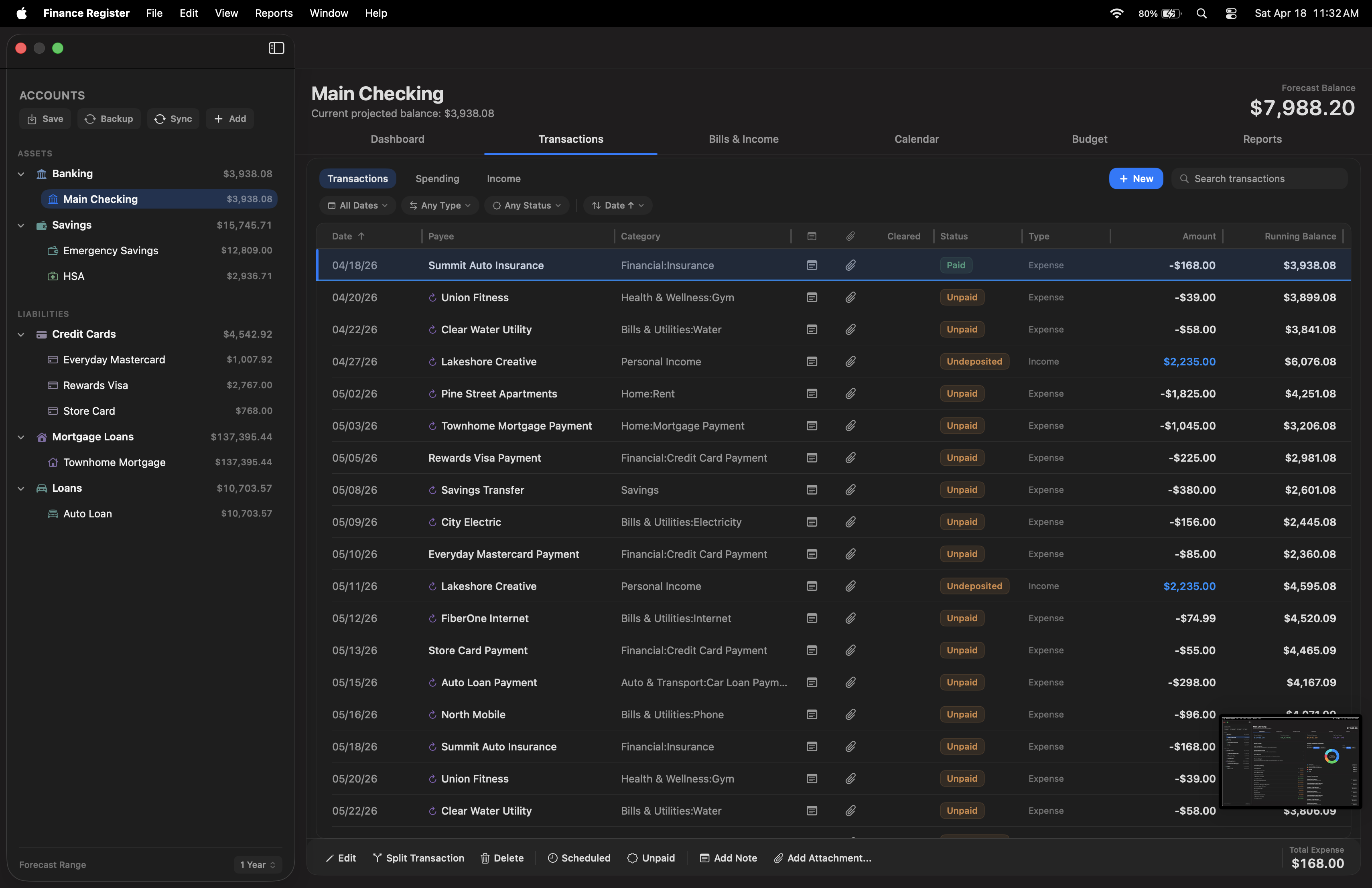 Screenshots shown in English.

Keep current balances, upcoming activity, category trends, and savings goals in view while staying one step away from the full register and planning tools.
See the feature breakdowniCloud sync
iCloud sync keeps Finance Register on your Mac and the Finance Register iPhone app connected, so your balances, transactions, and recent activity are always up to date.
Full desktop workflow — registers, bills, budgets, and reports.
Balances, upcoming bills, and reminders on the go.
Data confidence
Reconcile helps verify balances, backups and restore protect the account file, and CSV import paths support moving data into the app with more confidence.
Privacy
Keep account files, backups, and attachments on your Mac, with export options available when you decide to move or back up your data.
Account views
Checking, credit cards, loans, and mortgages each surface the details that matter most for that kind of account — from available credit to payoff timing.
Credit cards
See current balance, available credit, utilization, and estimated payoff timing alongside upcoming charges and scheduled payments.
Screenshots shown in English.Loans & mortgages
Track balance owed, estimated interest this month, principal reduction, and the payoff date with loan schedule details in view.
Screenshots shown in English.Ownership
Pay once, own it forever. No monthly fees, no renewals, no strings attached — just your app and your data, yours to keep.
A single purchase through the App Store — no subscription, no monthly charges.
Keep using Finance Register on your Mac without recurring fees or renewals.
Local-first storage keeps your records on your Mac — never locked behind a paywall.
Support
Have a question, run into something unexpected, or want to share feedback? Reach out directly — every message goes to a real person.
App Store
Learn what the app does here, then continue to Apple's listing when you are ready to download.